
CAP for Node.js 외부 REST API 소비 — cds.connect + Destination Service 완전 가이드
CAP for Node.js 외부 REST API 소비 — cds.connect + Destination Service 완전 가이드
TL;DR — 5분 안에 알아둘 것
현대 엔터프라이즈 애플리케이션은 단독으로 동작하지 않습니다. SAP S/4HANA의 Business Partner API, 외부 결제 게이트웨이, 사내 마이크로서비스 등 다양한 시스템과 데이터를 주고받아야 합니다. CAP(Cloud Application Programming Model) for Node.js는 cds.connect.to()라는 추상화 계층을 통해 이러한 외부 REST/OData API 소비를 일관된 방식으로 제공합니다.
본 글에서는 외부 API 소비의 전 과정을 다룹니다.
- 외부 OData 서비스 모델을 CAP 프로젝트로 import 하기
cds.connect.to()로 외부 서비스에 연결하고 호출하기- 로컬 개발용 자격 증명(.cdsrc-private.json) 설정
- BTP Destination Service와 연동하여 Cloud Foundry/Kyma에 배포
- CSRF 토큰, Timeout, 오류 처리 등 프로덕션 고려사항
사전 가정
본 가이드를 따라가기 위해서는 CAP 프로젝트 구조(db/, srv/, app/)에 대한 기본 이해와 Node.js의 비동기 처리(async/await)에 익숙해야 합니다. 또한 OData V2/V4 프로토콜의 기본 개념과 SAP BTP의 서비스 인스턴스/바인딩 개념(VCAP_SERVICES)에 대한 사전 지식이 도움이 됩니다. CDS 모델링 언어(service, entity) 기본 문법은 필수 전제 조건입니다.
테스트 환경
본 가이드는 다음 환경에서 검증되었습니다(2026년 4월 기준).
- Node.js: 20 LTS 이상 권장
- @sap/cds: 8.x 이상 (
cds.connect.to()시그니처 기준) - @sap/cds-dk: 글로벌 설치 —
npm i -g @sap/cds-dk - BTP 환경: Cloud Foundry 또는 Kyma 런타임, Destination Service 인스턴스
- 대상 시스템: SAP S/4HANA Cloud(또는 On-Premise + Cloud Connector), Northwind 등 외부 OData 엔드포인트
준비물로는 (1) 외부 시스템의 EDMX 메타데이터($metadata) 파일, (2) BTP 서브어카운트와 Destination, (3) Cloud Foundry CLI 또는 kubectl가 필요합니다. 일반적으로 로컬에서는 mocked 서비스로 개발하고, 배포 시점에 실제 Destination에 연결하는 흐름을 권장합니다.
4. 핵심 개념
CAP의 외부 API 소비 모델을 이해하려면 세 가지 개념을 분리해서 보아야 합니다.
4.1 cds.connect.to() — 서비스 추상화의 핵심
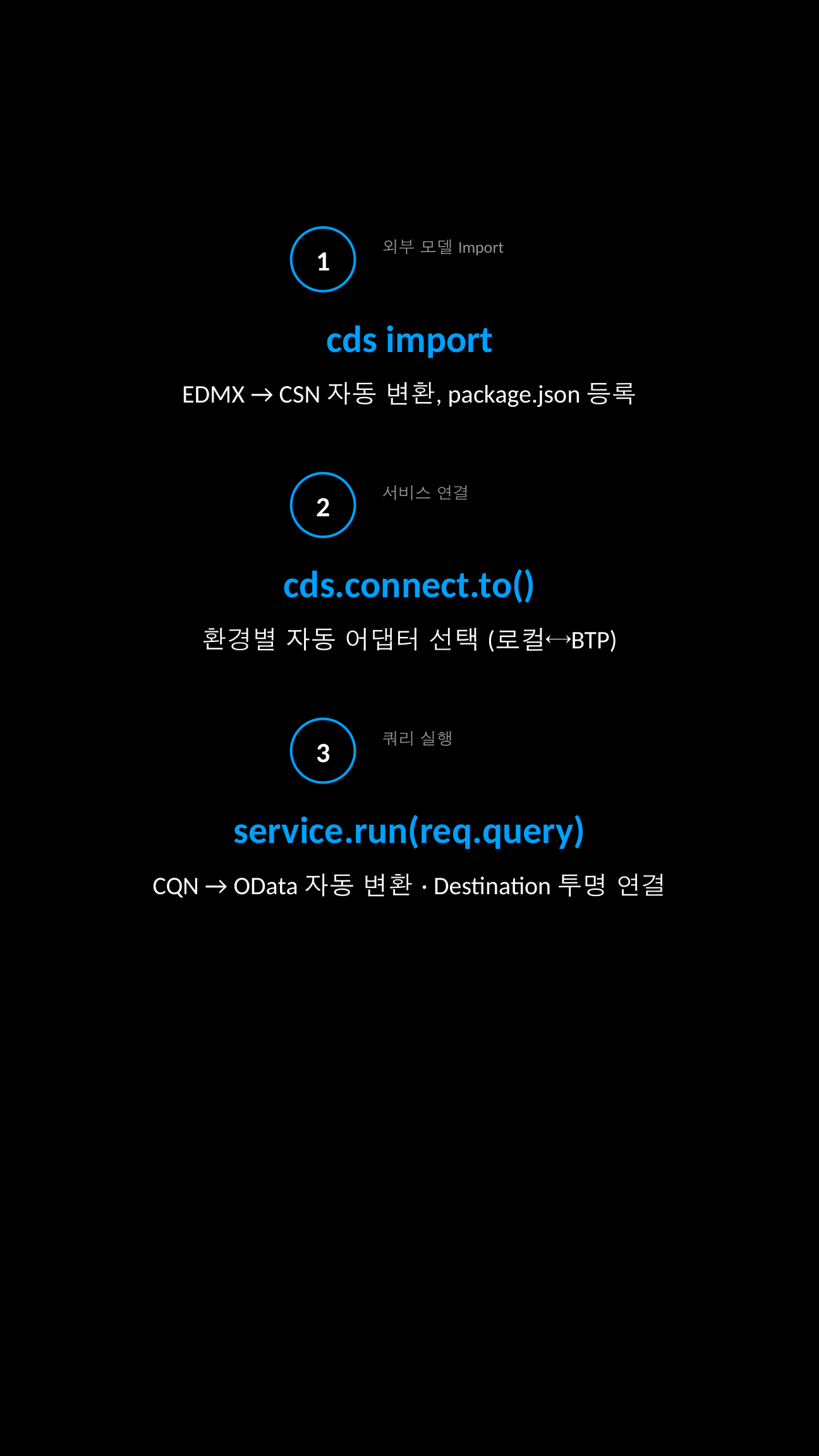
cds.connect.to(name, options?)는 이름(name)으로 식별되는 서비스에 연결하여 Service 인스턴스를 반환합니다. 이 함수는 호출 시점의 환경(local, CF, Kyma)에 따라 자동으로 적절한 어댑터(odata, rest, sql, kafka 등)를 선택합니다. 비유하자면 USB-C 포트와 같습니다 — 동일한 인터페이스로 다양한 백엔드를 연결할 수 있습니다.
4.2 Required Services — package.json 선언
cds.requires 섹션에서 외부 의존성을 선언하면 CAP 런타임이 자동으로 해당 서비스를 부트스트랩합니다. kind 속성은 어댑터 종류(odata-v2, odata-v4, rest)를 의미하며, model은 외부 시스템의 CSN/CDS 모델 경로를 가리킵니다.
4.3 Credentials Resolution — 자격 증명 해석 순서
CAP는 자격 증명을 다음 우선순위로 탐색합니다.
process.env.cds_requires_<name>_credentials_*환경 변수VCAP_SERVICES(Cloud Foundry 환경)- Service Binding 파일(Kyma/K8s)
.cdsrc-private.json또는default-env.json(로컬)package.json의cds.requires기본값
핵심 원리: 코드는 동일하게 유지하고, 환경 설정만 바꿔서 로컬↔클라우드를 전환합니다. 이것이 CAP의 "single source of truth" 철학입니다.
4.4 Mashup 시나리오
외부 데이터를 자체 엔티티에 "끼워 넣는" 패턴을 mashup이라 합니다. 예를 들어 자체 Reviews 엔티티의 productId를 외부 Product API의 데이터와 결합하여 통합된 OData 응답으로 반환할 수 있습니다.
직접 해보기 (3단계)
5.1 1단계 — 기본 예제: 외부 OData 서비스 import 및 호출
먼저 SAP API Business Hub에서 다운로드한 EDMX 파일을 CAP 프로젝트에 import 합니다.
# 터미널에서 실행
cds import ./API_BUSINESS_PARTNER.edmx --as cds
# 결과: srv/external/API_BUSINESS_PARTNER.csn, srv/external/API_BUSINESS_PARTNER.cds 생성package.json에 외부 서비스를 선언합니다.
{
  "cds": {
    "requires": {
      "API_BUSINESS_PARTNER": {
        "kind": "odata-v2",
        "model": "srv/external/API_BUSINESS_PARTNER",
        "csrf": true,
        "csrfInBatch": true
      }
    }
  }
}
서비스 핸들러에서 호출합니다.
// srv/risk-service.js
const cds = require('@sap/cds')

module.exports = cds.service.impl(async function () {
  const bupa = await cds.connect.to('API_BUSINESS_PARTNER')

  this.on('READ', 'BusinessPartners', async (req) => {
    // CQN 쿼리를 외부 OData로 자동 변환하여 전송
    return bupa.run(req.query)
  })
})
5.2 2단계 — 실무 시나리오: Mashup + 에러/로깅
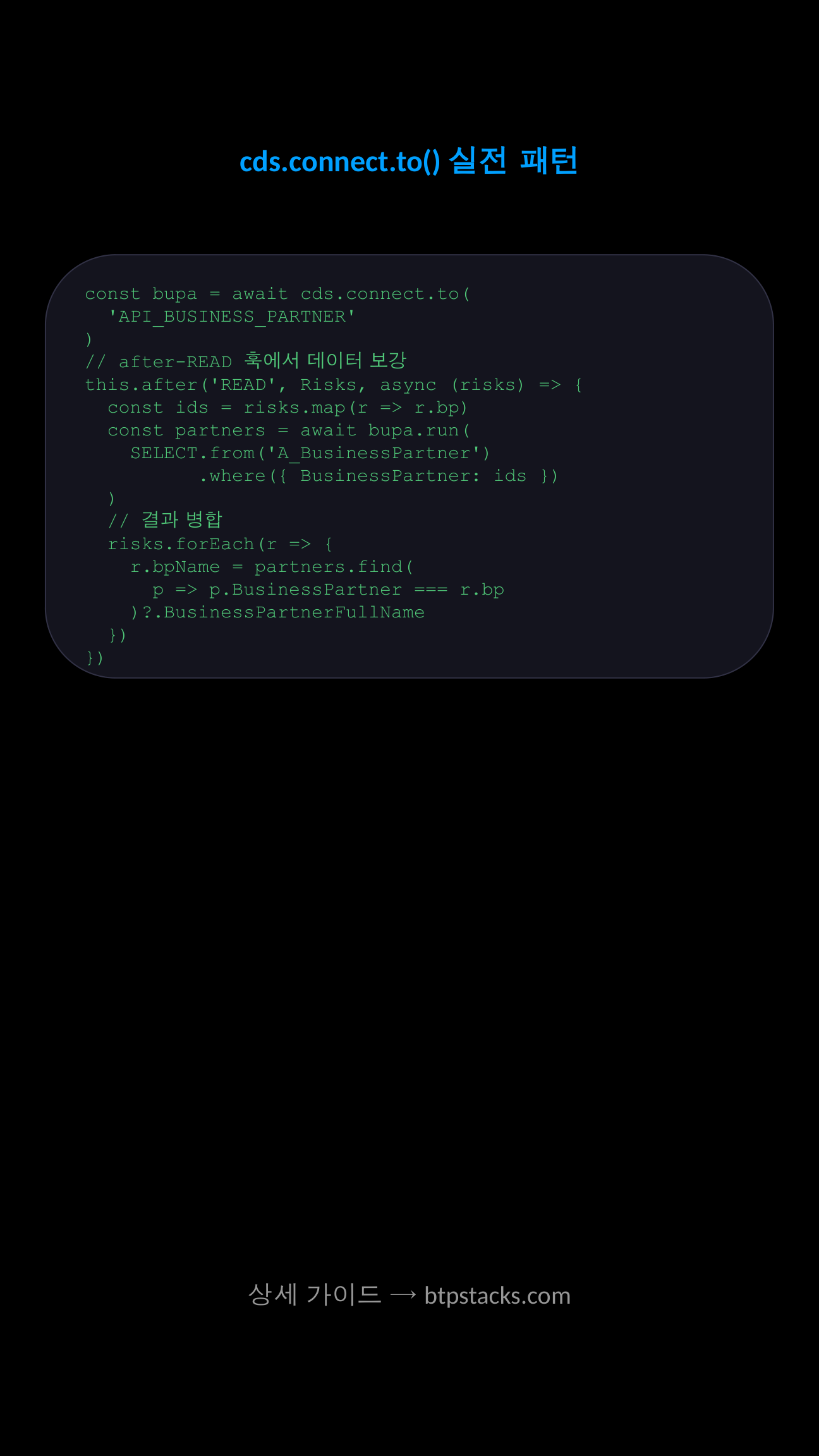
자체 Risks 엔티티에 외부 BusinessPartner 정보를 결합하는 패턴입니다. logger와 try/catch로 견고하게 만듭니다.
// srv/risk-service.js
const cds = require('@sap/cds')
const LOG = cds.log('risk-service')

module.exports = cds.service.impl(async function () {
  const { Risks } = this.entities
  const bupa = await cds.connect.to('API_BUSINESS_PARTNER')
  const { A_BusinessPartner } = bupa.entities

  // after-READ 훅에서 외부 API 호출하여 데이터 보강
  this.after('READ', Risks, async (risks, req) => {
    if (!risks) return
    const items = Array.isArray(risks) ? risks : [risks]
    const bpIds = [...new Set(items.map(r => r.bp_BusinessPartner).filter(Boolean))]
    if (bpIds.length === 0) return

    try {
      const partners = await bupa.run(
        SELECT.from(A_BusinessPartner)
              .columns('BusinessPartner', 'BusinessPartnerFullName')
              .where({ BusinessPartner: bpIds })
      )
      const lookup = Object.fromEntries(
        partners.map(p => [p.BusinessPartner, p.BusinessPartnerFullName])
      )
      items.forEach(r => {
        r.businessPartnerName = lookup[r.bp_BusinessPartner] || 'Unknown'
      })
      LOG.info(`Enriched ${items.length} risks with ${partners.length} partners`)
    } catch (err) {
      LOG.error('BusinessPartner lookup failed:', err.message)
      // 외부 API 실패 시에도 자체 데이터는 반환되도록 graceful degradation
      items.forEach(r => { r.businessPartnerName = 'N/A' })
    }
  })
})
5.3 3단계 — 프로덕션: Destination + Timeout + 재시도
package.json의 profile별 설정으로 환경 분리를 구현합니다.
{
  "cds": {
    "requires": {
      "API_BUSINESS_PARTNER": {
        "kind": "odata-v2",
        "model": "srv/external/API_BUSINESS_PARTNER",
        "[development]": {
          "credentials": {
            "url": "http://localhost:4004/api-business-partner"
          }
        },
        "[production]": {
          "credentials": {
            "destination": "S4HANA_BUPA",
            "path": "/sap/opu/odata/sap/API_BUSINESS_PARTNER",
            "requestTimeout": 60000
          },
          "csrf": true,
          "csrfInBatch": true
        }
      },
      "destinations": true,
      "connectivity": true
    }
  }
}
커스텀 헤더와 인증 토큰 전파, 그리고 단순 재시도 로직 예시입니다.
// srv/risk-service.js (production-grade)
const cds = require('@sap/cds')
const LOG = cds.log('risk-service')

async function runWithRetry(service, query, attempts = 3) {
  for (let i = 1; i <= attempts; i++) {
    try {
      return await service.run(query)
    } catch (err) {
      const transient = [502, 503, 504].includes(err.code) || err.code === 'ETIMEDOUT'
      if (!transient || i === attempts) throw err
      const wait = 200 * 2 ** (i - 1)
      LOG.warn(`Retry ${i}/${attempts} after ${wait}ms: ${err.message}`)
      await new Promise(r => setTimeout(r, wait))
    }
  }
}

module.exports = cds.service.impl(async function () {
  const bupa = await cds.connect.to('API_BUSINESS_PARTNER')

  // 사용자 JWT를 외부 호출에 전파(Principal Propagation 시나리오)
  bupa.before('*', (req) => {
    if (req.context?.user?._challenges) {
      req.headers = req.headers || {}
      req.headers['x-correlation-id'] = req.context.id
    }
  })

  this.on('getPartnerName', async (req) => {
    const { id } = req.data
    const result = await runWithRetry(
      bupa,
      SELECT.one.from('A_BusinessPartner').where({ BusinessPartner: id })
    )
    if (!result) req.reject(404, `Partner ${id} not found`)
    return result.BusinessPartnerFullName
  })
})
삽질 노트 — 자주 만나는 함정
FAQ 1. "Cannot find service 'XXX'" 오류가 발생합니다
package.json의 cds.requires에 서비스가 등록되지 않았거나, cds.connect.to()에 전달한 이름의 대소문자가 일치하지 않을 때 발생합니다. cds env get requires 명령으로 현재 환경에서 인식되는 서비스 목록을 확인하세요.
FAQ 2. 로컬에서는 잘 동작하는데 CF 배포 후 401/403이 발생합니다
대부분 Destination 설정 또는 인증 흐름 문제입니다. (1) BTP Cockpit에서 Destination의 Authentication이 OAuth2SAMLBearerAssertion(Principal Propagation) 또는 BasicAuthentication으로 정확히 설정되었는지, (2) HTML5.DynamicDestination=true 등 추가 속성이 필요한지, (3) xs-security.json의 scope가 적절한지 점검하세요. cds.log('remote').info()로 실제 발송 헤더를 로깅하면 원인 파악이 빠릅니다.
FAQ 3. 변경 작업(POST/PUT/DELETE)에서 CSRF 토큰 오류가 납니다
OData V2 시스템(예: S/4HANA On-Premise)은 변경 요청 전에 x-csrf-token: fetch GET 호출이 필요합니다. package.json의 해당 서비스에 "csrf": true와, batch 사용 시 "csrfInBatch": true를 함께 설정해야 합니다. OData V4는 일반적으로 CSRF가 불필요합니다.
기타 자주 마주치는 함정
- Timeout 누락: 기본값이 길어 장애 전파가 발생합니다.
requestTimeout을 명시적으로 설정하세요(예: 30000~60000ms). - 모델 동기화 누락: 외부 시스템 EDMX가 변경되면
cds import를 다시 실행해야 합니다. CI 파이프라인에 포함시키는 것을 권장합니다. - 로컬 mock 미설정:
cds mock API_BUSINESS_PARTNER또는.cdsrc-private.json으로 로컬 mock URL을 지정하면 오프라인 개발이 가능합니다.
더 파볼 주제
본 글을 완료했다면 다음 주제로 확장해 보세요.
- Messaging 통합:
cds.connect.to('messaging')으로 SAP Event Mesh / Kafka 이벤트 기반 통합 - Resilience 패턴: Circuit Breaker(예:
opossum), Bulkhead, 캐싱(Redis/Hazelcast)을 결합한 안정성 강화 - SAP Cloud SDK 병행 사용: 복잡한 OData V2 batch나 BAPI 호출 시
@sap-cloud-sdk/odata-v2를 보완적으로 활용 - Approuter + Destination Forwarding: Frontend(UI5/Fiori)에서 직접 외부 API 호출이 필요한 경우의 라우팅 전략
- Test Doubles:
nock,cds.test, in-memory mock service로 외부 의존성 없는 단위 테스트 작성
더 읽어볼 자료
- CAP Node.js — cds.connect API Reference
- CAP Guides — Consuming Services
- CAP Node.js — Remote Services
- CAP Guides — Service Composition / Mashups
- help.sap.com — SAP BTP Destination Service
- help.sap.com — Consuming Services in CAP Applications
- help.sap.com — Principal Propagation in BTP
- SAP API Business Hub — API_BUSINESS_PARTNER
- CAP Node.js — cds.env Configuration
⚠️ 비공식 콘텐츠 안내
본 게시글은 btpstacks.com의 독립 학습 콘텐츠이며 SAP SE와 무관합니다. 공식 문서는 help.sap.com을 참고하세요.
SAP, ABAP, SAP BTP, SAPUI5, SAP Fiori는 독일 및 기타 국가에서 SAP SE의 상표 또는 등록상표입니다.
댓글 0
아직 댓글이 없습니다.